 PT
PTCASE STUDY 01 • NEOFIN
✦ 6 min read
An inbox that helps teams decide who to assist first
Company
Neofin
Period
2025
Role
Senior Product Designer
Team
Product, Engineering, Customer Success and customers
OVERVIEW • 00
What began as a request for another tab became a redesigned WhatsApp inbox with search, filters, sorting and clearer conversation context.
CHALLENGE • 01
The problem
Customers needed to find conversations, understand the queue and decide who to assist first. The initial answer suggested by leadership sounded simple: ‘Add a tab.’ The product already had four tabs, and a fifth would only split messages without addressing search, priority, context or query costs. I argued for discovery before turning an internal hypothesis into an interface.
RESEARCH • 02
I spoke with customers and teams close to the operation to learn where the inbox stopped supporting service and collections work.
I mapped the purpose of the four existing tabs, the criteria used outside the system and the signals needed to choose the next conversation.
I worked with Engineering on targeted search, reducing unnecessary queries and making backend data access more predictable.
DEFINITION • 03
Focus and direction
The research showed that teams needed to combine criteria to organize service work. The inbox had to support finding a conversation, filtering the queue and sorting priorities, with enough information to understand each customer's situation.
How might we help agents find the right conversation and decide what to do next?
APPROACH • 04
How I worked
I led the evolution across four versions. The first two tested the filter structure, the third added sorting and the fourth required people to select a data type before searching. The conversation overview also gained ownership, service source, unread messages, labels, SLA and priority signals. Everything was designed on Neotine, Neofin's adaptation of Mantine.
“Add a tab” → “How can we help agents decide on their next action?”
FROM A PRESCRIBED REQUEST TO THE REAL PROBLEM • 05
FEATURES • 06
Conversation overview
The overview brings together ownership, source, unread messages, labels and service deadlines so agents can understand a conversation before opening it.
Filters that fit the queue
Combinable criteria separate scenarios without multiplying tabs or imposing a rigid structure on every customer.
Priority sorting
Teams can reorder the list by urgency and context, complementing the view created by filters.
Targeted search
People first choose the type of data they want to search. This makes search clearer for users and more efficient for the backend.
SELECTED SCREENS • 07
How the interface changed across four versions
The sequence shows how filters, sorting and search were introduced progressively while keeping the inbox familiar.
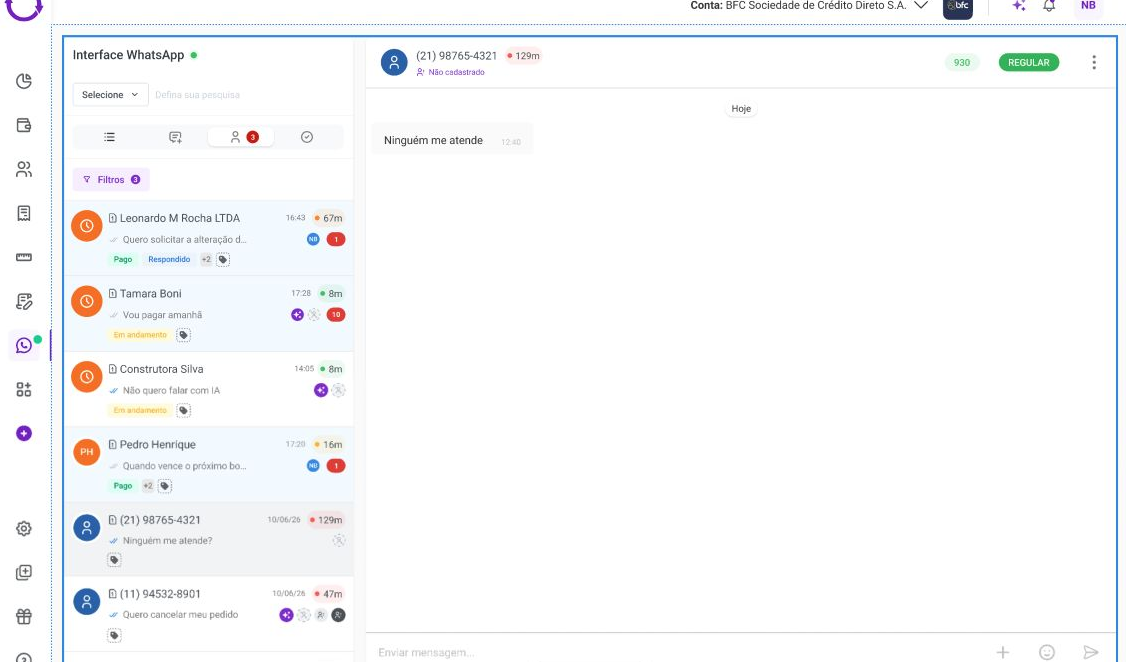
V1, organizing filters
In the first version, I designed filters the team could combine to organize conversations.
V2, refining selection
I adjusted the hierarchy to make filter states, application and removal easier to understand.
V3, adding sorting
Sorting complemented filtering, allowing the same queue to reflect different operational priorities.
V4, targeting search
Choosing a search type first reduced ambiguity in the interface and unnecessary infrastructure queries.
TESTING • 08
How we validated
The solution evolved from customer needs, technical constraints and reviews with Product and Engineering. The strongest feedback came from the operation itself: a customer reached out without prompting to thank the team and say the change had made daily work much easier.
RESULTS • 09
Qualitative evidence: unsolicited customer recognition of an improved operational routine
Technical estimate: up to 80% potential reduction in the compute cost of targeted search
Technical estimate: up to 75% potential improvement in search performance
LEARNINGS • 10
Asking for time to investigate made a difference. Understanding customers' routines and discussing constraints with Engineering led to a more useful solution than the fifth tab suggested at the start.
FULL PRESENTATION
Explore the project in more detail, with videos and next steps.
This presentation contains restricted material and requires a password. The presentation is available in Portuguese.
NEXT PROJECT