

CASE STUDY 02 • BRANDLOVRS, NOW CREATOR ADS
6 min read
Designing the first Creator Ads journey
- Company
- BrandLovrs, now Creator Ads
- Period
- Mid-2024–2025
- Role
- Product Designer, working with the Design Lead
- Team
- Design, Product, Engineering and Customer Success
OVERVIEW • 00
I worked on the first Creator Ads journey, from setting up a campaign on the web to submitting creator content in the BrandLovrs app.
CHALLENGE • 01
The problem
Maestro was the internal tool that supported the BrandLovrs Customer Success team. Keeping track of who was participating and what each creator had delivered was still a bottleneck. The CEO proposed a dedicated product to plan and run campaigns with many creators. That also meant redesigning what happened when the invitation reached the app.
RESEARCH • 02
We started with the CEO's proposal and continued the weekly conversations and observation with Customer Success that began during Maestro.
We studied Meta Ads, TikTok Ads and Google Ads for ways to structure campaign setup and management.
We mapped the journey for the brand, operations team and creator, from the brief to posting, and validated the flows with the team.
DEFINITION • 03
Focus and direction
The operations team created the campaign in Creator Ads, set the brief, deliverables, deadlines and budget, selected creators and sent invitations. In the BrandLovrs app, creators reviewed the terms, accepted the campaign and tracked their tasks. Their responses and submitted content went back to the web workspace. After approval, the app showed when and how to post.
How can a campaign with many creators be planned and tracked from beginning to end?
APPROACH • 04
How I worked
My Design Lead guided the design work and coordinated with leadership. I partnered with her on research, journey mapping and the first flows and interfaces. The two projects advanced in parallel. On the web, I advocated for a component foundation and the team chose shadcn/ui. In the app, we reused the native design system I had created and adapted the components for the new campaigns.
The invitation took the campaign from the web to the app. The creator's submission brought the content back for review.
FROM WEB TO APP • 05
FEATURES • 06
Guided campaign creation
Brief, objective, budget and campaign rules were organized into steps to reduce reliance on manual operations.
Stages, deliverables and timeline
One campaign could include multiple stages, posting formats and dates for production, approval and publishing.
Groups and invitations
The structure supported creator selection, groups and tracking of invitations and participation.
Campaign participation in the BrandLovrs app
Creators could check the brief and see the next action for each deliverable. The app confirmed submission, showed when to wait for brand review and displayed posting instructions after approval.
AI-assisted content review
The interface explored AI checks against brief guidelines as decision support while keeping human approval or rejection visible to the operation.
SELECTED SCREENS • 07
From the brief to the first submission
Early screens show campaign setup in Creator Ads and two steps in the creator experience in the BrandLovrs app.
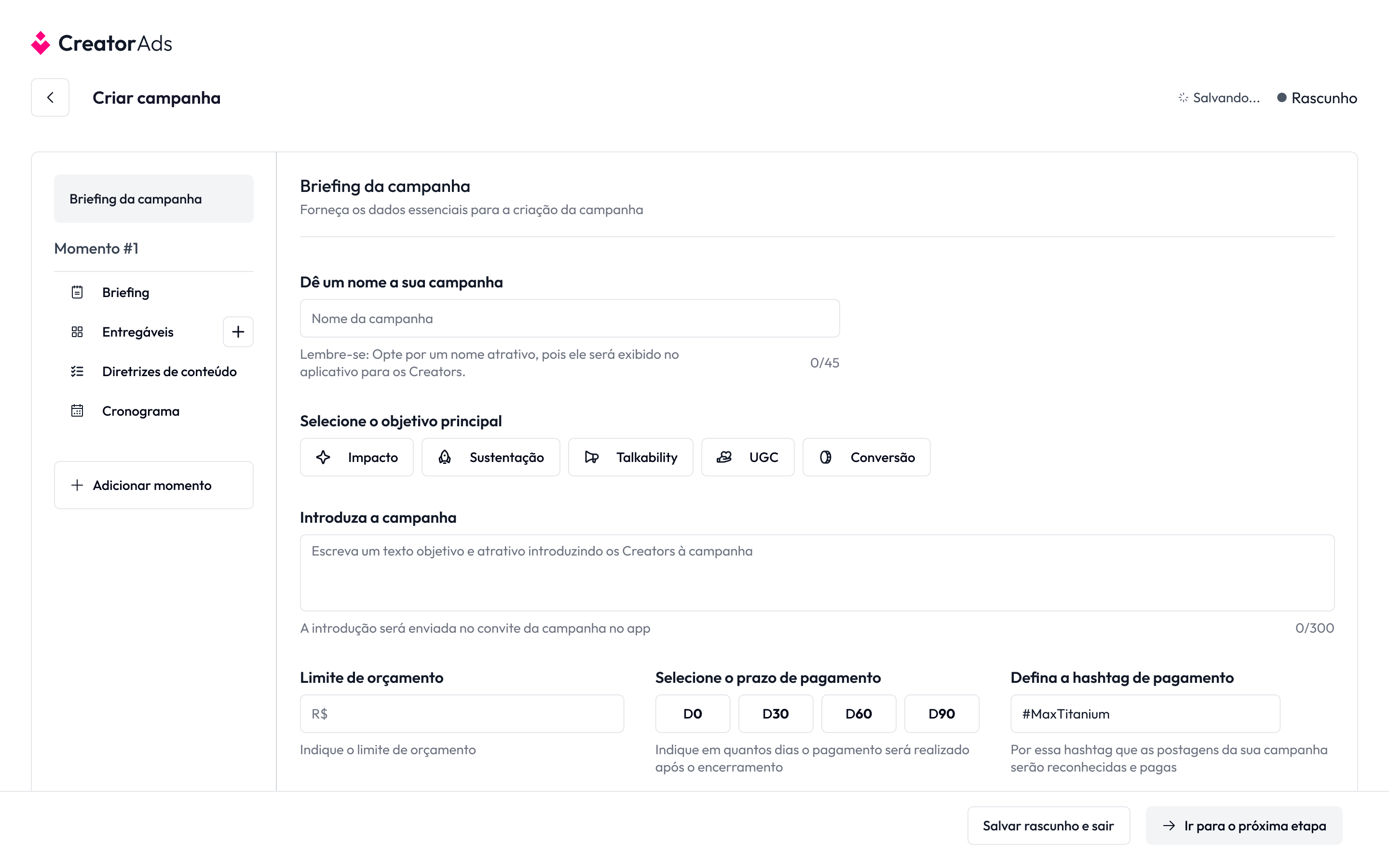
Open full imageCampaign brief
Creation starts with the objective, message and general parameters. Side navigation previews stages, deliverables, guidelines and timeline.
 Open full image
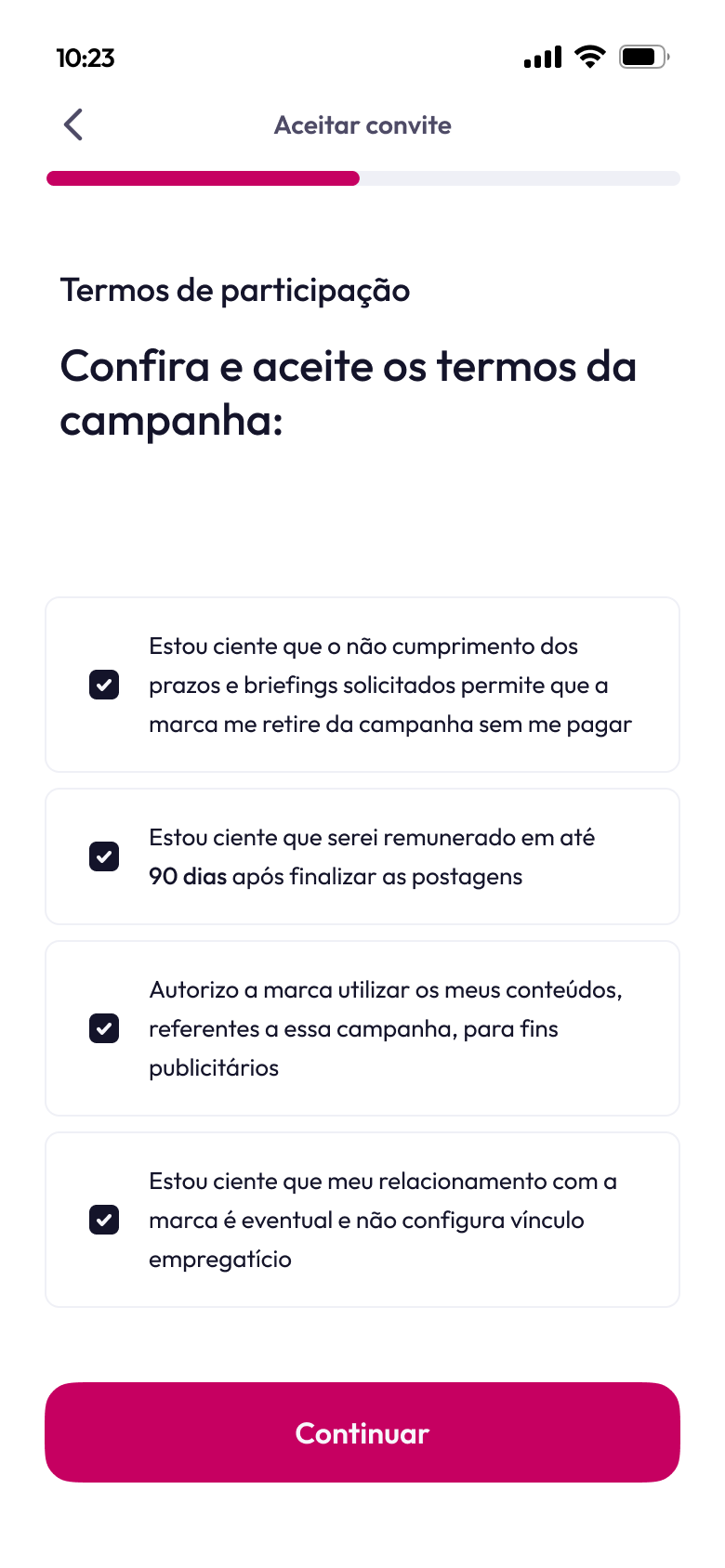
Accepting in the app
Creators reviewed the participation terms before accepting the invitation.
 Open full image
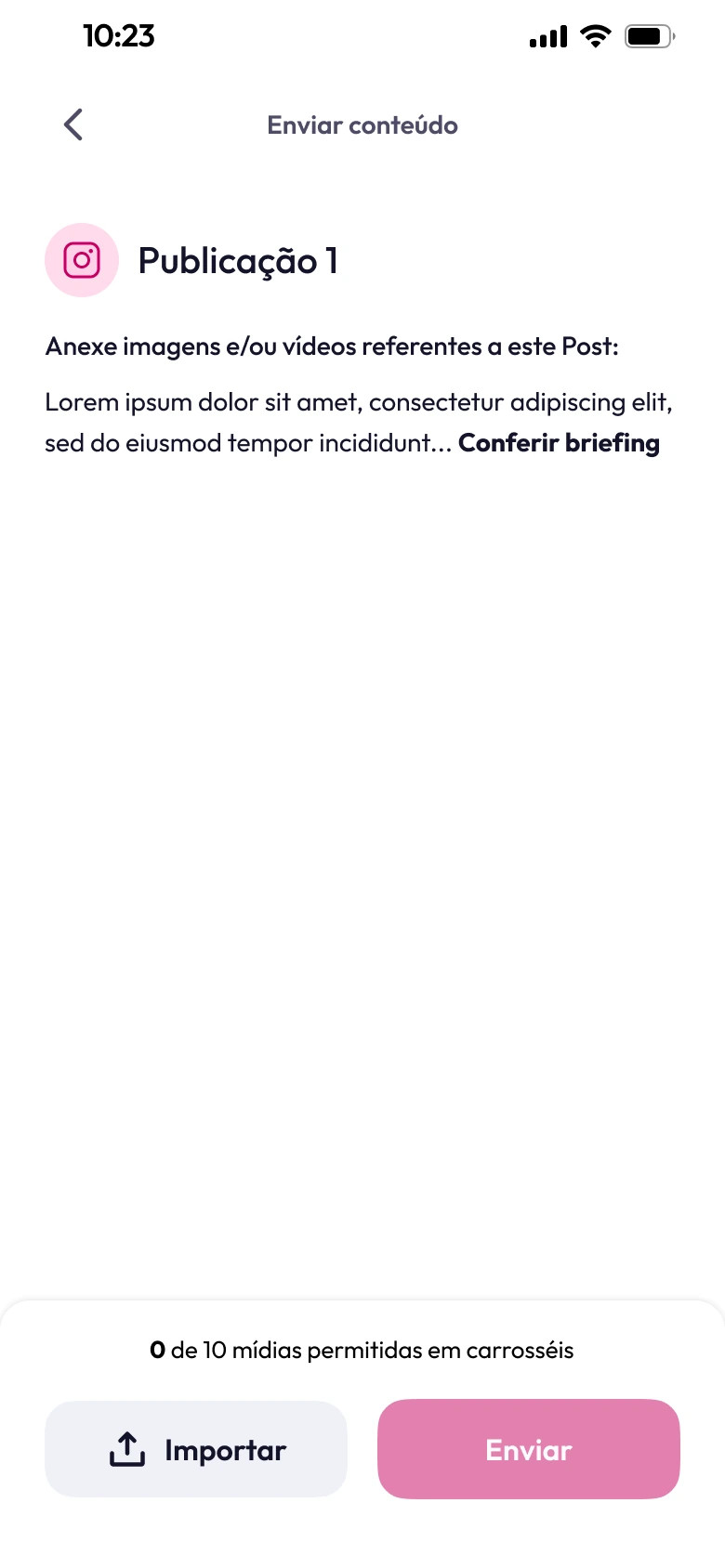
Submitting in the app
The brief stayed within reach while creators attached media for approval.
TESTING • 08
How we validated
We validated the flows with the team as the product took shape. I stayed with the project through the launch of the first media campaign in this phase.
RESULTS • 09
From a closed brief to an approved shortlist
Both timelines start with the brief and budget already closed and end when the brand approves the shortlist, before the formal invitation.
- Manual workflow with Maestro
- About 10 business days
- In an optimistic scenario, including finding creators and checking their interest.
- Creator Ads
- 1 to 2 business days
Retrospective estimates from the operation I worked on, with no formal measurement.
What changed in the workflow
Brief
- Manual workflow with Maestro
- Budget, guidelines and approvals passed through several people. Finalizing the brief alone could take around two weeks.
- Creator Ads
- Brands brought the budget, guidelines and deadlines together in a brief that operations and creators could consult.
Retrospective estimates from the operation I worked on, with no formal measurement.
Selection and invitations
- Manual workflow with Maestro
- Customer Success reviewed profiles one by one, built lists in Excel or Maestro and negotiated invitations manually. In some cases, brand approval took one to one and a half weeks.
- Creator Ads
- Marketing could filter richer creator profiles and build a group. A brand admin could approve the shortlist, and creators received their invitations in the app.
Retrospective estimates from the operation I worked on, with no formal measurement.
Content review
- Manual workflow with Maestro
- Creators shared a Drive link. Customer Success checked each submission before forwarding it to the brand for approval.
- Creator Ads
- Creators submitted in the app, which triggered a check against the brief’s guidelines. The brand reviewed in the platform or set up automatic approval based on the AI assessment.
Retrospective estimates from the operation I worked on, with no formal measurement.
Posting and payment
- Manual workflow with Maestro
- BrandLovrs already detected posts by hashtag. After verification, Customer Success released payment through Maestro.
- Creator Ads
- Confirmation of the post initiated payment on the agreed terms, such as net 30, 60 or 90 days. Automatic posting on the scheduled date was in testing when I left the project.
Retrospective estimates from the operation I worked on, with no formal measurement.
With brands able to handle selection and approval, Customer Success could focus on supporting the campaign instead of coordinating each step.
LEARNINGS • 10
The brief had to work for the person setting up the campaign, the person creating the content and the person reviewing it. Designing the two interfaces in parallel helped carry the same rules from one step to the next.
FULL PRESENTATION
Creator Ads Origins
This presentation contains restricted material and requires a password. The presentation is available in Portuguese.
NEXT PROJECT